
Download KeepVid Music – Free Music Manager, Downloader & Converter
Overview
KeepVid Music is a versatile music manager tool designed for anyone who wants to take full control of their audio collection. Whether you are a casual listener who wants to pull songs from YouTube, a DJ who needs fast conversion to a specific format, or a power user looking to sync music across multiple devices, KeepVid Music offers a single, secure platform that eliminates the hassle of juggling separate downloaders, converters, and library managers. The software lets you download tracks from popular streaming and sharing sites, convert them instantly to MP3, AAC, FLAC, or other formats, and then import the files directly into iTunes, Windows Media Player, or any folder of your choice.
In addition to downloading, KeepVid Music includes built‑in recording capabilities, a lightweight playback engine, and a robust tagging system that helps you keep your library organized by artist, album, genre, and mood. All of these features work without device or platform limits—meaning you can push music to smartphones, tablets, smart speakers, or even legacy MP3 players with a single click. The interface is clean, the process is automated, and the result is a fully curated music collection that is ready to play anywhere, anytime.
Because the program converts each file to the most compatible format for the target device, you never have to worry about unsupported codecs or quality loss. KeepVid Music is a free‑to‑try solution that balances power and simplicity, making it an attractive option for users who want a secure, all‑in‑one music manager that stays up‑to‑date with the latest streaming sites.
Key Features of KeepVid Music
- Unlimited Music Downloading: Pull tracks from YouTube, SoundCloud, Vimeo, and more without daily caps or hidden fees.
- One‑Click Format Conversion: Convert downloads instantly to MP3, AAC, WAV, FLAC, or OGG, with bitrate options up to 320 kbps.
- Cross‑Device Sync: Transfer music to iOS, Android, Windows, macOS, and even older MP3 players without manual re‑encoding.
- Integrated Recording Engine: Capture live streams or local audio sources directly into your library, perfect for podcasts or live concerts.
- Smart Tagging & Library Management: Auto‑populate ID3 tags, album art, and lyrics; organize tracks into playlists, folders, or smart collections.
- Secure Download Protocols: Uses HTTPS and encrypted storage to protect your downloaded files from tampering.
- Batch Processing: Queue multiple URLs, set conversion presets, and let the software handle the rest while you work.
- Regular Updates: Frequent updates keep up with changes on streaming platforms, ensuring continued compatibility.
- Lightweight Playback: Built‑in player supports gapless playback, equalizer presets, and visualizers without needing external apps.
- Free Trial & Affordable License: Test all features for 30 days; upgrade to a lifetime license for a single low price.
Installation & Usage Guide
Getting started with KeepVid Music is straightforward, even for users who are not tech‑savvy. First, visit the official KeepVid website and click the Download for Windows or Download for macOS button, depending on your operating system. The installer is a small, signed executable that runs in under a minute. During installation, you’ll be prompted to choose a destination folder; we recommend the default location so the program can automatically update later. Once installed, launch KeepVid Music and you’ll be greeted by a clean dashboard divided into three main panels: Download, Convert, and Library.
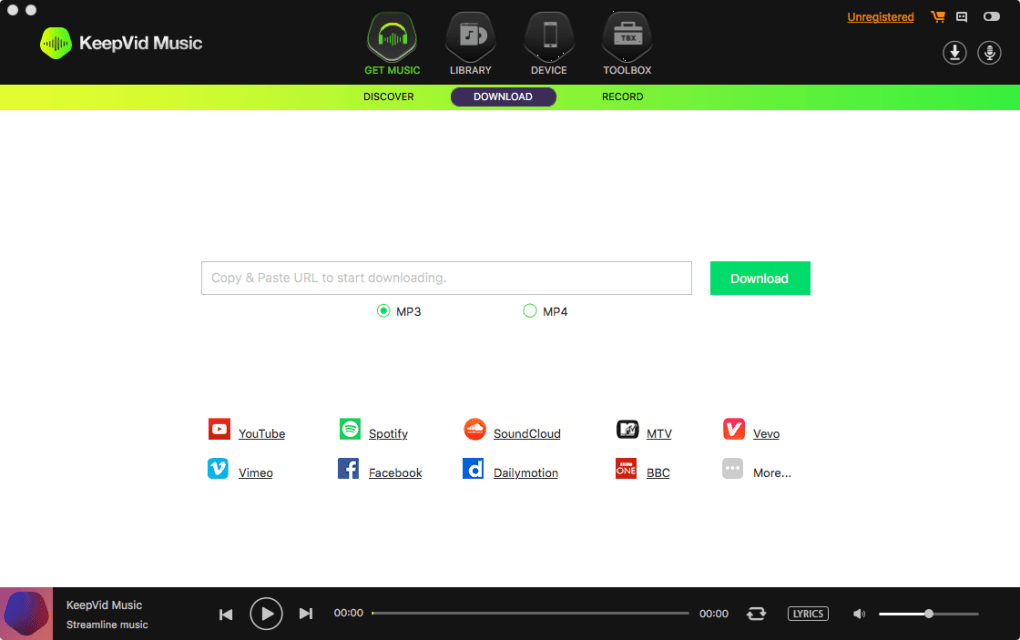
To download a song, copy the URL from YouTube, SoundCloud, or any supported site and paste it into the input field at the top of the Download panel. Choose your desired output format from the dropdown menu—MP3 is the default for most users, but you can select FLAC for lossless quality if your device supports it. Click Start and the software will fetch the audio stream, strip out the video portion, and save the file to the preset download folder. If you have multiple URLs, simply add them to the queue; KeepVid Music will process each one sequentially, applying the same conversion settings.
After the download finishes, the track appears in the Library panel where you can edit metadata, add album art, or assign it to a playlist. The tagging wizard automatically searches online databases such as MusicBrainz and Discogs to fill in missing information, but you can manually override any field. For playback, use the built‑in player at the bottom of the screen; it supports shuffle, repeat, and a basic equalizer to fine‑tune the sound. When you’re ready to sync music to a device, connect your smartphone or tablet via USB or Wi‑Fi, select the target device from the Transfer tab, and press Sync. The software will automatically convert the files to the most compatible codec for the device, ensuring smooth playback without additional steps.
KeepVid Music also includes a “Smart Scheduler” feature that lets you set automatic downloads for newly released tracks from your favorite artists. Simply add the artist’s channel URL to the scheduler, pick a release frequency, and the program will fetch new songs as soon as they appear online. This automation turns your computer into a personal music curator, constantly expanding your library with fresh content.
Compatibility & System Requirements
KeepVid Music is built to run on the most common desktop and mobile platforms, ensuring that you can manage your music regardless of your preferred device ecosystem. Below is a detailed breakdown of supported operating systems, hardware recommendations, and any optional components that enhance performance.
- Windows: Windows 10 (64‑bit) or later; requires .NET Framework 4.7+; 2 GB RAM minimum (4 GB recommended); 200 MB free disk space for installation; compatible with both Intel and AMD processors.
- macOS: macOS 10.14 (Mojave) or later; 2 GB RAM minimum (4 GB recommended); 250 MB free disk space; works on Apple Silicon (M1/M2) and Intel Macs via native binary.
- Android: Android 7.0 (Nougat) or higher; 1 GB RAM; 150 MB storage; Google Play Services required for in‑app updates.
- iOS: iOS 12.0 or later; iPhone, iPad, or iPod touch; 500 MB free storage; requires Apple’s App Store for installation.
- Linux (Beta): Ubuntu 18.04+ or Debian‑based distributions; requires Wine 6.0+ for Windows compatibility layer; 2 GB RAM; 200 MB storage.
The software automatically detects the best audio codec for the connected device. For example, when syncing to an iPhone, KeepVid Music converts tracks to AAC 256 kbps, while Android devices receive MP3 320 kbps by default. If you need a specific format, you can override the automatic selection in the Preferences menu.
KeepVid Music also supports integration with popular media players. It can add downloaded tracks directly to iTunes, Windows Media Player, or the native Music app on macOS. For users who prefer third‑party libraries such as VLC or foobar2000, the program offers a “Export to Folder” option that places the files in a user‑defined directory, making them instantly visible to any player that monitors that folder.
Pros and Cons
Pros
- Unlimited downloads from a wide range of streaming sites.
- One‑click conversion to multiple high‑quality audio formats.
- Seamless cross‑device sync with automatic codec selection.
- Built‑in recorder for live streams and local audio sources.
- Smart tagging that pulls metadata from reputable online databases.
- Batch processing and scheduler for hands‑free library growth.
- Regular updates keep up with changes on video‑sharing platforms.
- Free trial with a low‑cost lifetime license for full features.
Cons
- Desktop version is only available for Windows and macOS; mobile apps have fewer features.
- Initial download size is modest, but large music libraries can consume significant disk space.
- Advanced audio editing (e.g., equalization, mastering) is not included.
- Linux support is currently in beta and requires Wine.
- Some streaming sites may temporarily block downloads during platform updates.
Frequently Asked Questions
Can KeepVid Music download entire playlists from YouTube?
Yes. By copying the playlist URL into the download field, KeepVid Music will automatically retrieve each track, convert them to your chosen format, and add them to your library in the same order as the original playlist.
Is the software safe to use with copyrighted material?
KeepVid Music is a neutral tool that downloads publicly available audio streams. Users are responsible for complying with local copyright laws. The program does not provide any DRM‑removal capabilities.
What audio quality can I expect after conversion?
The software supports up to 320 kbps MP3, 256 kbps AAC, and lossless FLAC at 24‑bit/96 kHz. Quality is preserved as long as the source stream provides sufficient bitrate; otherwise, the conversion will match the original quality.
Can I use KeepVid Music on a Mac with Apple Silicon?
Yes. KeepVid Music offers a native Apple Silicon build, ensuring optimal performance on M1 and M2 Macs without the need for Rosetta translation.
How does the free trial differ from the paid version?
The 30‑day trial unlocks all features, including unlimited downloads, batch conversion, and device sync. After the trial, the software will still run but will limit downloads to 10 tracks per day unless you purchase the lifetime license.
Conclusion & Call to Action
KeepVid Music stands out as a comprehensive, secure, and user‑friendly music manager that consolidates downloading, converting, recording, and syncing into a single application. Its ability to handle unlimited downloads from the most popular streaming sites, combined with automatic format conversion and cross‑device compatibility, makes it an indispensable tool for anyone serious about building a personal music library. While the desktop version shines on Windows and macOS, the mobile apps provide a convenient on‑the‑go experience, albeit with a trimmed feature set. The pros clearly outweigh the cons, especially for users who value automation and high‑quality output without needing advanced audio editing tools.
If you’re ready to streamline your music collection, protect your files with secure downloads, and enjoy hassle‑free playback on every device, click the button below to download KeepVid Music now. Start with the free trial, explore the full feature set, and decide if the lifetime license fits your workflow. Take control of your audio library today—no limits, no hidden fees, just pure music freedom.







